Shop
Search parts for your car once. See what fits, then go to the store that has it.
A replay of adding a vehicle in MachineOS: a VIN is typed and decoded.
Coming soon to the App Store · iPhone
MachineOS builds a 3D twin of your vehicle, looks through your camera with you, and walks you through the fix, down to the part that fits.
Your twin
Scan the VIN and MachineOS knows the year, make, model and engine. Add a few photos and it builds a 3D model of your car: the outside from your pictures, the inside fitted to what’s under it.
Explode
This Bronco comes apart into 132 parts, from the bumpers to the timing cover, each where it sits on the truck. Tap any part to see what it is.
Issues
Say the truck stalls when it’s warm, and every part that could cause it lights up on the model, the likeliest first. Each stays lit until a test clears it.
Live
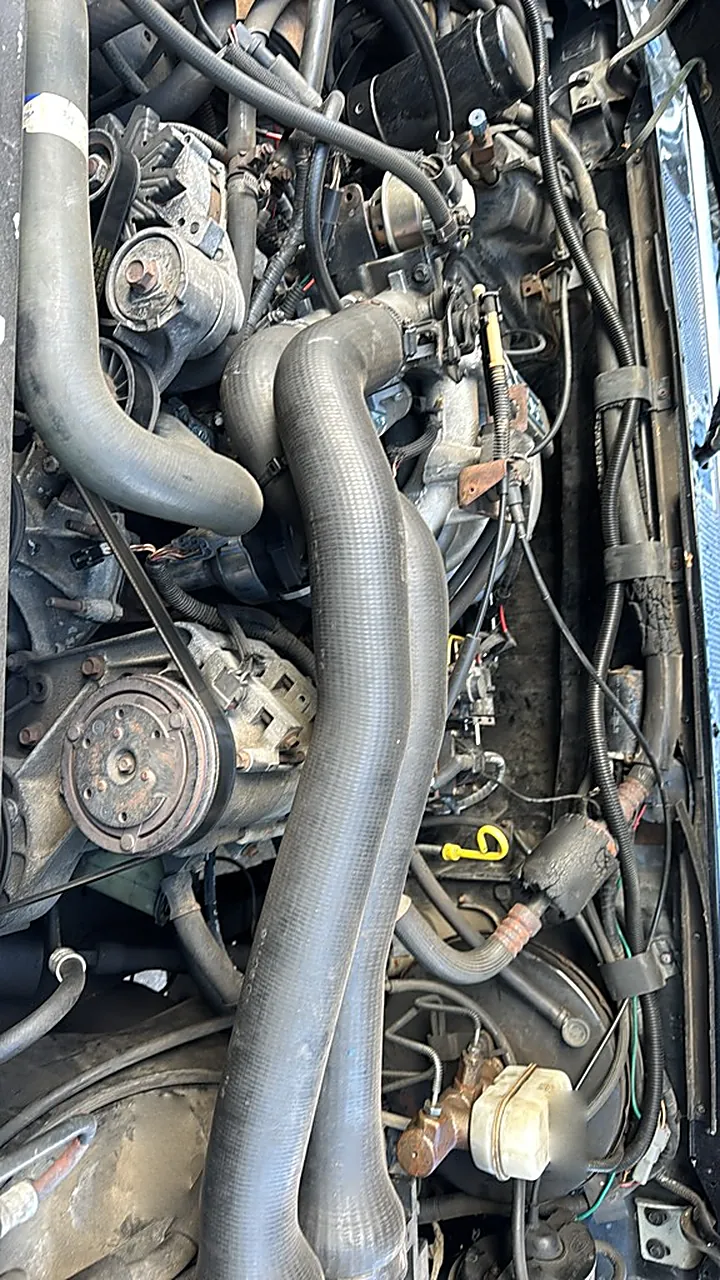
Turn on Live, point the camera at the engine bay, and talk. The Mechanic sees what you see, answers out loud, and marks the part on your screen.
You asked: “Where do I check the oil?” The Mechanic: That yellow loop is the dipstick. Engine off a few minutes, pull it, wipe it, push it back in, then pull it again. Oil should sit between the two marks. Marked on the camera: Oil dipstick.
Replay
Ask the way you'd ask a friend leaning over the fender. It answers out loud.
It circles the part it means, right on the camera.
When something needs ruling out, a voice walks you through the check.
The frames it needed stay in the conversation for later.
Ask with a photo
Snap what’s wrong and ask. The Mechanic marks up your photo, tells you what it sees, and gives you the steps and the how-to videos for your car.
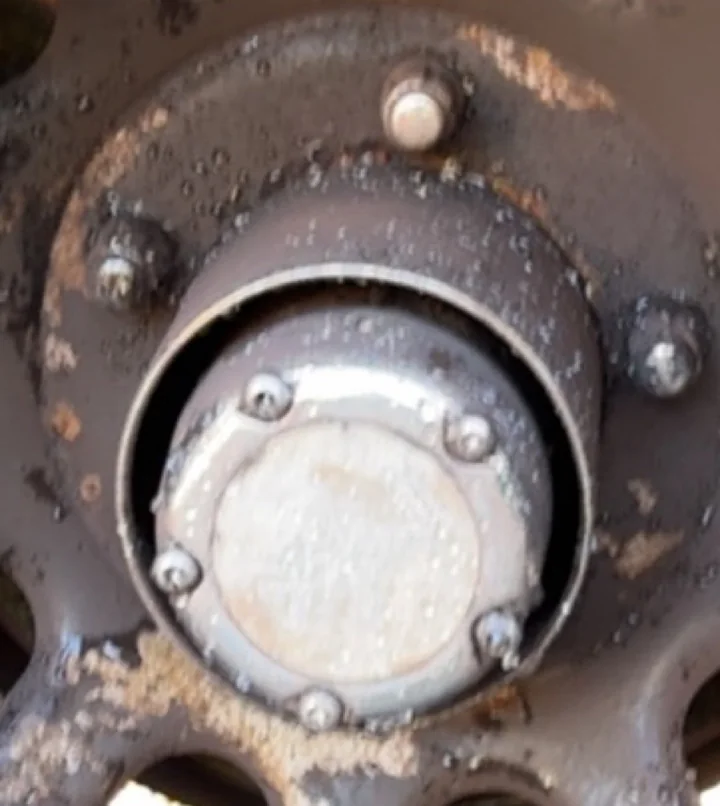
Rust is starting on my wheels. How do I get it off?
That’s surface rust on the steel wheels, not rot. Caught now, it comes off with a wire brush and a fresh coat of paint.
1Surface rust2Starting here too3Hub: tape it offMarked up: 1, surface rust along the bottom of the wheel; 2, rust starting top right; 3, the locking hub, to tape off.What you’ll need
Wire wheel for a drill · 80-grit paper · Wax and grease remover · Rust converter · Self-etching primer · Wheel paint · Painter’s tape
Steps
Safety Eye protection and a dust mask while you wire-brush.
How-to videos
More on YouTube ↗ 12:31Strip and repaint rusty steel wheelsSame kind of wheel
 7:05Rust converter on pitted metalFor the pitted spots
ExampleThe photo is the owner’s Bronco. The videos are stand-ins; in the app they’re how-tos found for your car.
From symptom to fixed
Describe what’s wrong. MachineOS opens a case: the clues, the likely parts, and the check that settles each one. Parts stay in question on your twin until a test clears them, and every new chat knows what’s still open.
You: My Bronco stalls once it’s warm, then won’t restart for a while.
Mechanic: Stalling hot and restarting once it cools points first at the ignition module on the distributor, a known weak spot on these trucks. Let’s test it before buying anything.
Check
With the engine warm and idling, tap the ignition module with a screwdriver handle and wiggle its plug.
Listen for a stumble or a stall.
The rest of the garage
Search parts for your car once. See what fits, then go to the store that has it.
Photograph your tools and MachineOS recognises them and keeps the list for your jobs.
Every fix and every mod in one place, with its parts, costs, notes and the shop that did the work.
Save the videos that help. They stay with the job and the parts they’re about.
NHTSA recalls for your year, make and model, right in your feed.
A guided video lap around the car records how it looks today, for your twin.
Community
Your Garage is your profile: your cars, your builds and your posts. Follow other owners, see what they fixed, and share your Garage with a link.

Ninety Bronco @ninetybronco
’90 Bronco, 5.8 V8, 4×4. Chasing a stall that only shows up warm.
Questions
MachineOS is an iPhone app for working on your own car. Tell the Mechanic what’s going on and it narrows down the cause, finds the part that fits your car, and walks you through the repair step by step, with how-to videos that jump to the moment each step is shown.
Describe the problem in your own words, like “it stalls once it’s warm” or “it squeals on a cold start”. The Mechanic opens a case, lights up the likely causes on your car’s 3D model, and gives you a check for each one, so you rule things out before you spend money on parts. If you already have a trouble code from a scanner or a parts store, add it to the case.
Doing the job yourself saves the labour. What usually costs DIYers is buying the wrong part or fixing the wrong thing. MachineOS checks the cause before you buy, matches parts to your exact car, and keeps a list of the tools you already have, so a job starts with what you need and nothing extra.
Add your car by its VIN and MachineOS knows the year, make, model and engine. Search for a part once, see what fits your car, then go to the store that has it.
Yes. Ask how a job is done and the Mechanic writes a step-by-step plan for your car and pulls up how-to videos for it. Each step plays from the moment a video shows it. Under the hood, turn on Live, point your camera at the engine bay and ask: the Mechanic answers out loud and marks the part on your screen.
Every fix and every mod on a car lives in one place, with its parts, costs, notes and the shop that did the work. Your Garage is your profile: share your build with a link, follow other owners and see what they fixed on cars like yours.
Cars and trucks with a VIN, including pre-1981 classics with shorter VINs. Any car can also be added by typing its year, make and model, and one that isn’t in the catalog is added anyway.
No. The Mechanic tells you what a part is, where it is on your car and how to check it, one step at a time, in plain words. If you already know your way around an engine bay, skip ahead: it works at your pace.
It’s built for doing the work yourself. If you decide a job is one for a shop, you go in knowing what’s likely wrong and which part it needs.
It’s coming soon to the App Store for iPhones running iOS 17.4 or later, in the United States at launch.
The privacy policy explains what MachineOS collects and why.